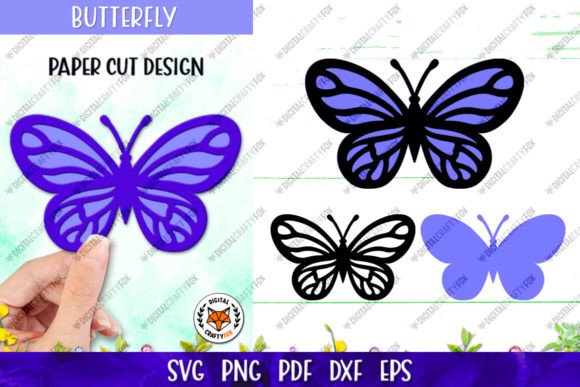
3D Butterfly Design Cut File
Adding dimension to flat crafts can transform a simple project into a striking piece of art. A Butterfly Cut File designed with layering in mind offers crafters, designers, and small business owners an accessible way to achieve this 3D effect without needing advanced sculpting skills. Whether you are working with paper, vinyl, or fabric, using a pre-designed layered template saves time and ensures professional-looking results. This guide explores the versatility of these digital assets and how they can elevate your creative workflow.
Understanding the Layered Approach
The core appeal of a 3D Butterfly Design lies in its construction. Unlike a standard single-layer silhouette, this design consists of two distinct layers that stack upon one another. When assembled, the top layer creates shadow and depth against the bottom layer, mimicking the natural structure of butterfly wings. This technique is particularly popular in paper crafting, where the slight lift between layers adds tangible texture.
For beginners, understanding how these layers interact is key. The base layer typically provides the structural foundation and broader color fields, while the top layer adds intricate details, patterns, or contrasting shades. By using a Paper cut butterfly template that is already optimized for this separation, you avoid the guesswork of manually dividing a complex image. The result is a balanced composition that looks intentional and polished.
Versatility Across Cutting Methods
One of the greatest advantages of purchasing a high-quality digital bundle is compatibility. Crafters use a wide variety of tools, from electronic cutting machines to traditional hand scissors. A well-prepared Layered butterfly file set accommodates all these methods seamlessly.
- Laser Cutting and CNC: For users with laser cutters, the precision of vector files ensures clean edges. The DXF and EPS10 formats included in the archive are industry standards for these machines, allowing for accurate scaling and cutting without pixelation.
- Vinyl and Paper Cutters: If you use devices like Cricut or Silhouette, the SVG file is your go-to format. It retains scalability and allows you to separate the two layers easily within your design software. You can assign different colors or materials to each layer before sending the job to your machine.
- Hand Cutting: Not everyone has access to digital cutters. The inclusion of PNG files with thin black outlines makes hand cutting feasible. These outlines serve as a clear guide, ensuring that even with scissors or a craft knife, your cuts remain precise and consistent.
Ideal for Sublimation and Digital Projects
Beyond physical cutting, these files are excellent for sublimation printing. The PDF and PNG files provided at 300 dpi on a transparent background are perfect for transferring designs onto mugs, t-shirts, or tote bags. Because the background is transparent, you do not need to spend extra time removing white space in editing software. The RGB color profile ensures that the colors appear vibrant on screens and print well on sublimation papers, though it is important to remember that monitor settings can affect how colors look before printing.
Digital creators also benefit from these assets. Bloggers, social media managers, and graphic designers can use the high-resolution PNGs for website headers, invitation designs, or digital scrapbooking. The large artboard size of 3600x3600 pixels means you can scale the image down for small icons or keep it large for posters without losing quality.
Practical Use Cases for Creators
Why choose a Butterfly Cut File for your next project? The applications are vast and cater to both personal enjoyment and commercial ventures.
- Greeting Cards and Invitations: A layered butterfly adds elegance to wedding invitations or birthday cards. The 3D effect catches the light and draws the eye, making the card feel more luxurious than a flat print.
- Home Decor: Create wall art by mounting multiple butterflies in varying sizes on a canvas or frame. The shadow play between the layers and the wall creates a dynamic visual installation.
- Educational Activities: Teachers can use these templates for biology lessons or art classes. Students can learn about symmetry and anatomy while assembling the two layers, enhancing fine motor skills.
- Product Customization: Small business owners selling personalized items can use these designs for quick customization. Since the files are digital downloads, you can produce inventory on demand, reducing waste and storage costs.
Technical Specifications and File Formats
When you purchase this product, you receive a comprehensive zip archive containing everything needed for various projects. Understanding what each file does helps streamline your workflow:
- DXF File: Ideal for CAD programs and certain cutting machines that prefer this older but reliable vector format.
- SVG File: The most versatile vector format for web-based design software and modern cutting machines. It allows for easy editing of nodes and paths.
- EPS10 File: A standard vector format compatible with professional design software like Adobe Illustrator. It ensures high-quality scaling for large-format prints.
- PDF File: Provided at 300 dpi with a transparent background in RGB. This is ready for immediate printing or viewing without specialized vector software.
- PNG Files for Hand Cutting: These include thin black outlines to guide manual cutting, making the process easier for those without machines.
- High-Resolution PNGs: At 300 dpi on a transparent background, these are perfect for digital overlays, sublimation, and high-quality printing.
The artboard size for the butterfly is set to 3600x3600 pixels. This high resolution ensures that whether you are printing a small sticker or a large poster, the edges remain crisp and clear. Remember, these files are for digital download only, so ensure you have a stable internet connection and sufficient storage space on your device.
Important Considerations for Best Results
While digital files offer consistency, real-world results can vary. It is crucial to note that colors may differ from actual output depending on your computer monitor and resolution. There may be some discrepancies between the way colors are displayed on the screen and the actual printing. To mitigate this, consider doing a test print on your specific material before committing to a large batch.
Additionally, when working with paper, the type of stock matters. Heavier cardstock holds the 3D shape better than thin printer paper. If you are using vinyl, ensure your weeding tools are sharp to handle the intricate details of the top layer. For sublimation, always check your heat press settings against the manufacturer's recommendations for your specific blank product.
If you have any questions about file compatibility or usage, please contact me. I am happy to help clarify any technical details to ensure your project succeeds. If you liked the product, please rate my store. Your feedback helps improve the shop and assists other creators in finding quality resources. Thank you for visiting my store. Have a nice day.